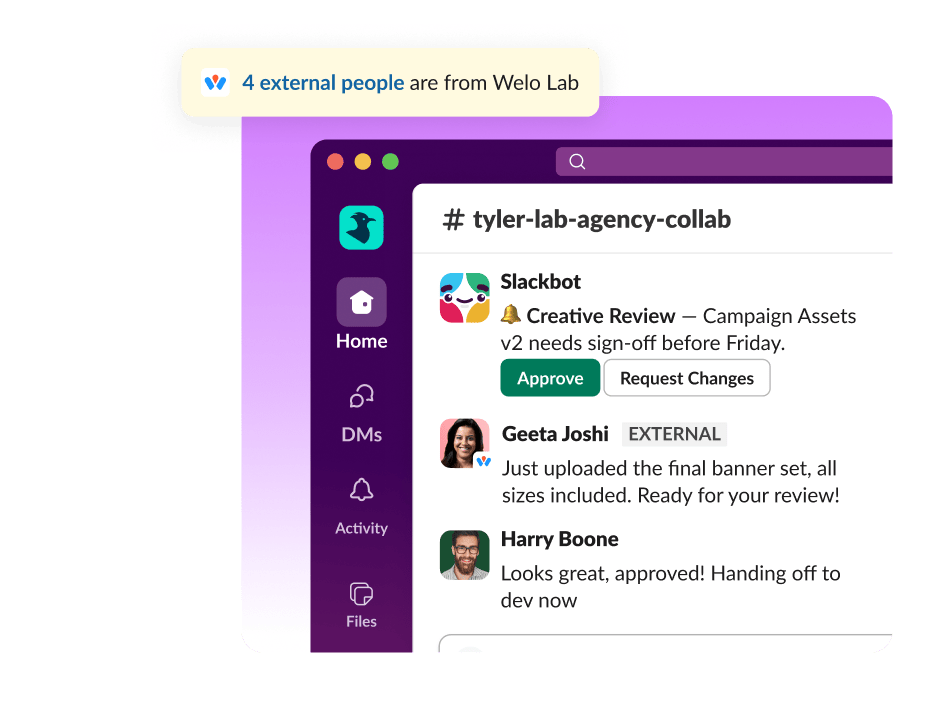
About this use case
External collaboration can break down when conversations are scattered across email threads, meeting notes, shared drives, and disconnected apps. Decisions get buried, and external partners can end up working from outdated information.
Slack brings external collaboration into the same centralized work operating system where internal work already happens. You can communicate securely with clients, vendors, agencies, and other stakeholders using shared channels, workflow automation, integrations, and AI-powered tools that keep work visible and organized across teams.
Here are practical ways to collaborate externally in Slack, plus broader best practices to build efficient cross-company workflows.
How to collaborate with external partners in Slack
Working with external partners becomes far easier when everyone can communicate in one shared space. By using channels, shared workspaces, and controlled access settings, teams can bring external partners directly into the conversation without sacrificing security.
Slack features like shared channels, workflow automation, integrations, and AI-powered tools help teams stay aligned and improve business productivity. Here's a more detailed look at the Slack features that support external collaboration:
Use Slack Connect to eliminate messy external email chains
Slack Connect lets organizations collaborate securely with external partners directly within Slack. Instead of relying on long email chains and disconnected tools, teams can communicate in real time, share files, coordinate approvals, and track decisions in one place. Teams using Slack Connect have reported 2x faster turnaround on creative review and approvals, plus a 50% reduction in weekly meetings for teams working with contractors.
By bringing external stakeholders into the same workspace, Slack Connect helps reduce communication silos, speed up response times, and keep projects moving with improved visibility.
Use Slackbot to manage administrative tasks and reminders
Slackbot is a personal AI for work built directly into Slack that helps teams keep external collaboration organized with automated reminders, quick answers, and lightweight guidance woven into daily workflows. Teams can use Slackbot to send deadline reminders, prompt stakeholders for updates, answer common process questions, or direct people to the right resources without adding extra administrative work.
Because these reminders happen directly within conversations and channels, teams can reduce missed approvals and repetitive follow-ups while keeping work moving across organizations.
Add dedicated channels for separate internal and external conversations
Channels help teams organize external collaboration by project, customer, campaign, or partner relationship. Creating dedicated channels for specific workstreams keeps everything organized, so the right people have access to the right conversations, files, approvals, and updates.
Teams can also create internal channels to align on timelines, responsibilities, and feedback before sharing updates externally. Organized channel structures make it possible to search for information later, making it easy to surface buried documents and past discussions while reducing duplicate work.
Open shared channels for a unified cross-company workspace
Shared Slack channels create a central workspace where internal teams and external partners can collaborate together on active projects. With shared channels, gone are the days of juggling email chains and disconnected review processes. Instead, teams can easily share updates, review files, resolve questions, and move approvals forward within the same conversation.
Working from a shared channel history also reduces delays caused by missing context or scattered feedback. Conversations and action items stay connected in real time, improving visibility across organizations.
Automate workflows to cut out manual follow-ups
Workflow automation helps teams reduce manual follow-ups and keep external collaboration moving consistently across organizations. Teams can automate recurring tasks like approval requests, onboarding workflows, status check-ins, reminders, and intake forms so projects don't stall waiting for updates or responses.
Workflow Builder also connects with external tools and systems, helping teams standardize processes across organizations while reducing administrative work and communication delays.
Integrate your tech to keep external stakeholders aligned
Integrations connect Slack with the other tools your team already uses for work, from project management platforms, CRM systems, and ticketing systems to file-sharing tools, calendars, and other business apps. With Slack's integrations, teams can receive project updates from project management tools, share files from Google Drive, create Salesforce records, or manage support tickets without leaving Slack.
Centralizing this information helps reduce context switching, makes it easier to track work in real time, and keeps external stakeholders up to date without having to send frequent manual updates.
Launch huddles and clips to sync without formal calendar invites
Huddles and clips give teams lightweight ways to communicate quickly with external partners without scheduling formal meetings.
Teams can jump into a huddle to resolve questions in real time, review feedback together, or make faster decisions when async communication starts slowing progress. According to Slack research, teams that use huddles report a 37 percent increase in productivity.
Clips support asynchronous collaboration by letting teams record short video or audio updates that partners can review on their own schedule. This helps reduce meeting overload while still giving teams a faster, more contextual way to explain changes or walk through project updates.
Slack Connect simplifies our communication with partners that help move our technology and operational work streams forward.
Benefits of collaborating externally with Slack
Slack gives organizations a shared collaboration layer where internal teams and external partners can coordinate work faster, maintain visibility across projects, and keep communication organized without sacrificing security or administrative oversight.
Some of the biggest benefits of collaborating externally in Slack include:
- Faster communication and decision-making. Shared channels, huddles, and real-time messaging help teams resolve questions and move approvals forward faster without waiting on long email chains or scheduled meetings.
- Reduced email overload and fragmented communication. Keeping conversations, files, updates, and feedback in Slack reduces the need to manage scattered inboxes and disconnected collaboration tools.
- Enterprise-grade security. With Slack Connect, you decide not only which external partners can join, but also what they can see and share. Every interaction on Slack adheres to rigorous privacy standards and compliance certifications.
- Improved visibility across projects and stakeholders. Shared conversations and searchable workflows help internal teams and external partners stay aligned on timelines, deliverables, approvals, and next steps.
- More secure file sharing. Teams can securely share documents, feedback, and project assets directly within Slack while maintaining organizational oversight and administrative controls.
- Greater accountability and faster response times. Channel-based collaboration makes it easier to track ownership, surface blockers, and follow progress without relying on manual status updates and follow-up meetings.
- Searchable communication and documentation history. Conversations, shared files, and decisions remain searchable over time, helping teams quickly find important context and reduce duplicated work.
- Stronger client, vendor, and partner relationships. Faster communication, better transparency, and more organized collaboration can help external partnerships run more smoothly. Slack research also found that teams using Slack report 39 percent fewer meetings and 47 percent higher productivity.
What is external collaboration?
External collaboration is the process of working with people outside your organization on shared business goals, projects, and day-to-day operations. This can include clients, vendors, agencies, contractors, suppliers, consultants, and strategic partners who regularly coordinate with internal teams.
External collaboration often involves project planning, file sharing, customer communication, approvals, onboarding, feedback cycles, and collaborative execution across multiple organizations. As organizations become more distributed across remote teams, outside vendors, and global partners, businesses increasingly rely on secure, centralized collaboration systems to coordinate work efficiently.
Best practices for effective external collaboration
Strong external collaboration requires clear communication, organized documentation, defined responsibilities, and secure systems for coordinating work across organizations. The following best practices can help teams move projects forward faster and build stronger working relationships with external partners:
- Establish clear communication channels for each partner or project. Create dedicated Slack channels for specific customers, vendors, campaigns, or workstreams so conversations, files, and approvals stay organized and easy to follow.
- Define ownership, permissions, and response expectations early. Set clear guidelines around who owns decisions, who has access to information, expected response times, and how approvals should move through the funnel.
- Reduce reliance on long email chains. Shared channels in Slack Connect help teams keep communication in one place instead of splitting discussions across inboxes, meetings, and disconnected tools.
- Standardize workflows and approval processes. Consistent processes reduce delays and confusion, especially when multiple organizations are involved. Workflow automation can also help teams automate repetitive tasks like reminders, approvals, onboarding steps, and status updates.
- Keep communication and decision history searchable. Centralized conversations and documentation make it easier to revisit feedback, surface past decisions, and onboard new stakeholders without losing context.
- Prioritize transparency while maintaining secure access controls. Teams should make project information accessible to the right stakeholders while still maintaining administrative oversight and secure collaboration practices.
- Use async communication whenever possible. Tools like clips, threads, and automated updates help teams collaborate across schedules and time zones without creating unnecessary meetings.
How to improve security and governance in external collaboration
External collaboration requires organizations to balance speed and flexibility with oversight and control. Slack Connect and Slack admin controls support secure collaboration while helping organizations maintain visibility, compliance, and administrative oversight across external workflows.
Key security and governance best practices include:
- Role-based permissions. Control access to channels, workflows, files, and conversations based on team roles and responsibilities so sensitive information stays limited to the right stakeholders.
- Guest access management. Use guest accounts, which limit external access to only the channels, documents, and resources partners need to complete their work.
- Shared channel governance. Slack Connect gives organizations oversight into how shared channels are created, managed, approved, and maintained across teams and outside organizations.
- Data retention and compliance. Administrative controls help organizations manage retention policies, compliance requirements, and long-term documentation practices across communication and file-sharing workflows.
- Approvals and administrative visibility. Teams can standardize approval workflows while administrators maintain visibility into collaboration activity, external access, and organizational communication patterns.
Collaborate more effectively with Slack
Effective external collaborations depend on visibility, security, clear accountability, organized workflows, and communication systems that reduce friction. The solution isn't simply more communication tools — it's bringing all your existing tools together so conversations, approvals, files, workflows, and decisions all live in one place.
With Slack, you can coordinate with external partners securely and seamlessly, minimizing the back-and-forth that comes with cross-collaboration. Explore Slack's collaboration features, integrations, and the Slack template gallery to build more secure, organized, and scalable external collaboration workflows.


