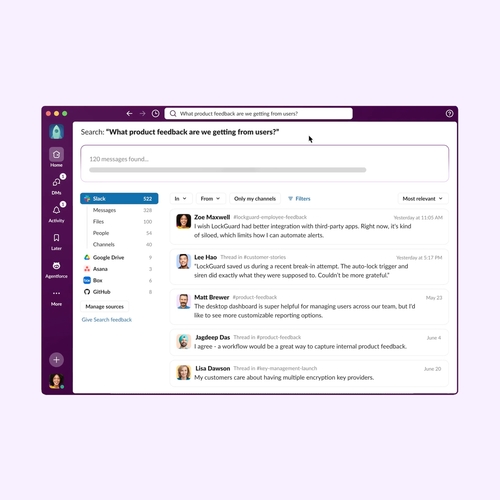
Work has a clutter problem: too many updates to track, systems to check, and routine tasks that pull focus. In this article, you’ll learn how productivity AI eliminates that clutter, which tasks AI assistants handle best, and how to choose and deploy the right setup for your team.
What is an AI assistant for business?
An AI assistant for business uses natural language processing and large language models to answer questions, automate tasks, and coordinate work across business systems.
This means helping teams turn everyday requests into answers, updates, and completed tasks. Employees can ask for assistance in plain language instead of working through every step manually. The most useful assistants are AI bots that live close to the work itself. In Slack, the AI assistant can draw from conversations, files, Salesforce records, installed apps, and enterprise search data sources that a user has permission to access.
How an AI assistant differs from a chatbot
A chatbot handles narrow, predefined questions using scripts or decision trees, whereas an AI assistant interprets intent across more complex inputs, applies business context, and helps move multi-step work forward across connected tools.
Core technologies behind AI business assistants
Natural language processing (NLP). NLP helps the assistant understand everyday language, even when a request is phrased casually or lacks detail. The assistant determines whether someone is asking for a status update, a document, or help completing a task.
Machine learning. Assistants rely on machine learning to recognize patterns from past activity and improve responses over time. For example, machine learning ranks useful sources for a request and identifies common next steps in workflows.
Large language models. These models help the assistant generate useful text, such as summaries, drafts, and suggested responses. They also help the assistant interpret longer, more complex requests that require more than a standard keyword match.
Retrieval-augmented generation. This grounds the assistant’s answers in approved business sources — internal documents, CRM records, knowledge bases, and project files — rather than relying only on the model’s training data.
Business use cases for AI assistants by function
The best AI assistant use cases address repeatable work that slows teams down. The value comes from reducing manual lookup and moving work quickly from request to resolution.
Customer service
AI is already changing service work. According to industry research, 81 percent of service reps who use AI say the technology frees them to work on more complex cases. AI assistant can triage tickets, draft responses, and locate customer account history, helping teams answer common questions faster while reps focus on sensitive or complex cases.
This is especially useful in shared Slack channels where support, product, and account teams already coordinate. When an issue needs input from another team, the assistant can summarize the problem, pull in relevant context, and help the group decide what comes next.
Sales
Updating records, writing follow-ups, preparing for calls, and gathering information from scattered channels eat into selling time.
An AI assistant can summarize deal activity, draft follow-up notes, and update CRM fields based on recent conversations. Industry research shows sellers expect AI agents to cut prospect research time by 34 percent and email drafting time by 36 percent. This is taken even further in Slack, where sales reps can use Slackbot, Salesforce integrations, and account channels to review account context, update records, draft follow-ups, and keep deal information close to the conversation.
HR and people operations
HR teams handle a steady flow of repeatable questions about benefits, policies, onboarding, leave requests, and internal mobility. An assistant can answer approved policy questions, route requests, and guide new hires through onboarding. Established employees can also use an assistant to find policy answers, locate forms, and route sensitive requests to the right HR contact.
For teams operating within Slack, AI assistance can help employees find approved policy information, while workflows and connected systems can route sensitive requests to the right HR contacts.
IT support
IT teams are ideal candidates for AI assistance because many tickets follow known patterns. Password resets, access requests, software questions, and device issues can be handled through approved steps.
In Slack, teams use Workflow Builder, connected apps, and agents to triage IT requests, collect details, suggest next steps, and route issues to the right team. When a ticketing tool is connected, workflows can also create or update tickets.
Marketing and operations
Marketing and operations teams manage campaign planning, reporting, and feedback cycles. An assistant can create a first draft from scattered inputs and turn updates into clear summaries the team can review.
AI assistance can also make handoffs easier by turning feedback, updates, and next steps into a shared brief the team can review in Slack. A campaign manager can ask for a recap of recent feedback, shape it into a brief, and keep the next version in the same Slack channel where the team is already coordinating.
System integration requirements for AI business assistants
In 95 percent of organizations, integration is one of the clearest impediments to effective AI support. An assistant needs access to systems holding customer records, approvals, project updates, and institutional knowledge. Without these connections, it can only deliver surface-level help. When systems are connected, the assistant responds with fuller context and suggests approved next steps.
CRM and sales systems. For sales and customer teams, an assistant should connect to the system holding account activity and pipeline details (Salesforce, HubSpot, or similar CRM). The assistant pulls account context into conversations, updates fields after customer calls, and starts approved follow-ups when deals reach new stages.
ERP and finance systems. ERP and finance systems hold approval, vendor, budget, and reporting details. An assistant pulls this information into requests so reviewers have necessary context and routes work through proper controls, giving teams faster answers without bypassing governance.
Communication and collaboration tools. An assistant should connect to collaboration tools where employees already work: Slack, email, and calendar. This lets the assistant summarize threads, create requests, and surface answers tied to discussions — like creating action items after a meeting or turning a message into a workflow request.
Knowledge bases and document storage. Knowledge bases and document storage give assistants the source material to answer with confidence. Connected to Confluence, Google Drive, SharePoint, and internal wikis, the assistant retrieves approved information and directs employees to the original source.
How to choose and implement an AI assistant for business
An effective rollout starts with identifying one task that slows teams down, then adding privacy rules, training, and measurement. The goal is to find the work that slows teams down, not to add AI everywhere at once.
- Start with a specific problem
Pick one repeatable workflow that happens frequently enough to measure — such as support ticket intake, sales follow-up drafting, onboarding questions, or status recaps. Define success before rollout: time saved, response time, ticket deflection, or fewer manual updates. - Evaluate data privacy and security
52 percent of IT security leaders are not sure they can deploy AI agents with the right guardrails. That’s why it’s important to review compliance needs, including GDPR, CCPA, SOC 2, and HIPAA. IT security leaders should also confirm data residency, encryption, admin controls, and how prompts and outputs are stored. - Plan for change management and adoption
Train people on what the assistant can and cannot do. Be clear about who manages the AI assistant, when people should bring in a human reviewer, and how the assistant fits into daily tasks. - Measure ROI and cost-benefit
Track time saved, ticket deflection, user adoption, and revenue-related signals where relevant. - Understand risks and ethical considerations
AI can produce inaccurate outputs, reflect bias in training data, or state claims without sufficient context. Set review expectations for decisions that require judgment. The assistant should support thinking, not replace it.
How Slack supports an AI assistant for business
Slack brings AI-generated answers, summaries, workflows, and business context into conversations where teams already make decisions.
Slackbot is Slack’s personal AI agent for work. It helps people find answers, summarize threads and files, draft content, prepare for meetings, and take action across connected systems using information the user has permission to access.
Personal AI agent experience. Slackbot lives inside Slack, so employees can ask questions, request summaries, draft content, and continue the work from the same place they’re already collaborating.
Conversation summaries and recaps. Slack AI summarizes channels and threads, schedules daily recaps, and auto-captures huddle notes. It also summarizes files and past conversations, helping teams catch up without scrolling.
Search across connected knowledge. Slackbot can help surface answers from Slack messages and files, Salesforce records, enterprise search data sources, and connected apps, while respecting each user’s permissions.
Workflow automation and connected actions. With Workflow Builder and connected apps, teams can route requests, collect details, and update approved systems from Slack. Slackbot can also take action across connected systems when those systems and permissions are in place.
Governance and admin controls. Slackbot respects existing permissions and access controls, runs within Slack’s trusted boundary, and is protected by Slack AI Guardrails to ensure privacy and security.
Slack uncovers the inefficiencies that might otherwise stay buried in scattered updates, slow handoffs, and routine follow-ups. Demo Slackbot today, and see how an AI assistant for business can help your team find answers, act faster, and turn everyday work clutter into clear next steps.
AI assistant for business FAQs
 Fantastico!
Grazie mille per il feedback!
Capito!
Grazie per il feedback!
Ops! Si è verificato un problema. Riprova più tardi.